iLauncher OS
- 4.2
- Rating
- 1.00M
- Installs
- Free
- Price
 Analysis by App-foxy
iLauncher OS is an Android personalization app built around one clear idea: giving an Android phone a different visual experience without replacing the device itself. I spent time with it as a launcher-style customization tool, and my overall impression is that it is most appealing to people who want a familiar phone to feel visually refreshed with very little commitment. It is free, aimed at everyone, and developed by Milepost Power Holdings, LLC.
My thesis is simple: iLauncher OS is a convenient appearance-first experiment, not a complete replacement for every Android launcher. It can make a phone feel more distinctive and can be a friendly starting point for someone who has never customized Android before. At the same time, users who want deep control, extensive automation, or a carefully documented power-user environment may find the experience narrower than expected.
What the iOS-inspired approach feels like in daily use
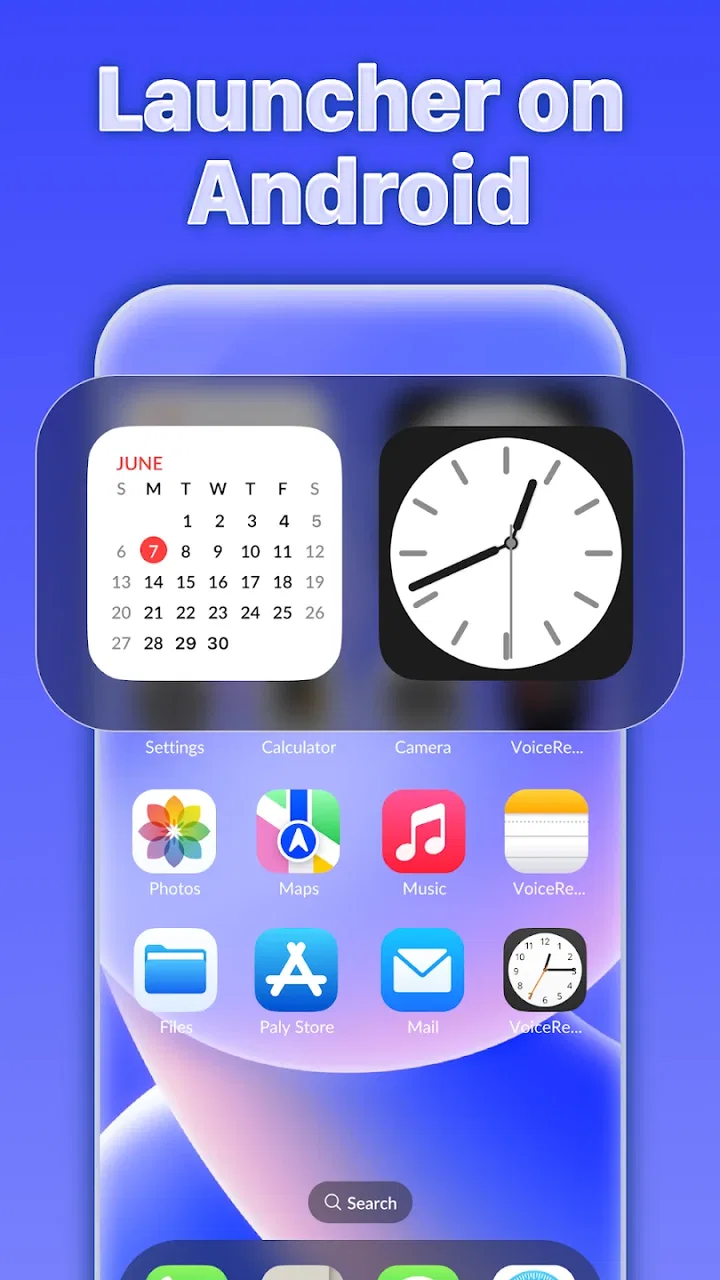
The first thing I noticed is how strongly the app focuses on the surface of the phone. Rather than asking me to redesign every part of Android, it presents itself as a way to set a new experience for the mobile phone. That makes the appeal immediate: the launcher is not trying to teach me a complicated system of themes, profiles, and nested settings before I can see a result.
You May Also Like

 Blood Strike: 2.5 Anniversary
Blood Strike’s Loadouts Turn Every Drop Into a Tactical Gamble
A close look at Blood Strike’s custom loadouts: how fast access to signature weapons reshapes its battle royale rhythm, rewards preparation, and narrows the gap between fights.

 Pandora - Music & Podcasts
Pandora’s Music Is Easy to Start, but Harder to Recover
Pandora’s strength is its low-effort path from a seed to a station. Its weak spot is how much confidence it asks you to place in connection, setup, and quiet recovery.

 8 Ball Pool
 Is Built on Rivalries, Rematches, and Routine
A close look at the rivalries, rematches, shared routines, and unanswered safety questions that turn a quick pool match into a persistent mobile community.

 Samsung Music
’s Quiet Strength Is Playing What You Already Own
Its reach comes less from spectacle than from dependable access to a personal library. That simplicity is both the app’s strongest retention engine and its ceiling.

 AccuWeather: Weather Radar
AccuWeather Review: A Quick, Clear Forecast for Everyday Decisions
For everyday plans, the best forecast is the one you can understand quickly. AccuWeather makes rain timing, radar, and local conditions easy to act on, with a few trade-offs.

 Hill Climb Racing
Why Hill Climb Racing Still Turns Crashes Into One More Run
A tiny car, a bumpy hill and one more upgrade: Hill Climb Racing keeps resurfacing because its simple chaos makes every near-miss feel personal.
More From Our News Desk



That simplicity is useful when the goal is visual change rather than technical experimentation. Someone who has used Android for years but is tired of the same home screen can try a different arrangement without buying a new handset. Someone moving between phones can also use the app as a way to make the interface feel closer to the design language they already enjoy.
I would not describe it as a universal transformation of Android. The phone remains an Android phone underneath, and that distinction matters. The app changes the way I reach apps and interact with the home screen, but it does not turn the device into a different operating system. For me, that is both the main attraction and the main boundary.
The store presents the app under the short description “iLauncher OS,” while its broader purpose is personalization. That combination tells me who it is for: not people searching for a productivity suite or a utility with a narrow job, but people who care about the look and feel of the first screen they see every time they unlock their phone.
A low-commitment way to refresh an older phone
One practical use case is an older Android phone that still works well but feels stale. Replacing the handset would be expensive and unnecessary, while changing a launcher can create a noticeable difference in everyday interaction. I can imagine setting it up on a family member’s phone, especially if that person wants a cleaner, more familiar-looking home screen but does not want to learn a complex customization system.
Another realistic scenario is temporary use. If I lend my phone to someone who is comfortable with an iOS-style layout but less comfortable with my usual Android arrangement, a launcher like this can make the starting point less intimidating. I would still explain that it is a visual and navigational layer, not an Apple operating system, but the change in presentation can reduce that initial friction.
It also suits people who enjoy trying interfaces. I often learn more about what I actually need from a phone by changing the home screen for a while. With a free personalization app, the experiment is easier to justify. If the layout does not suit me, I can return to my previous launcher instead of being locked into a permanent decision.
Where the app earns its strong reputation
The public response is encouraging without making the app look universally perfect. It holds an average rating of 4.2 from around sixteen thousand ratings, with more than three hundred written reviews. That level of interest suggests that the central promise connects with a substantial group of Android users: they want a recognizable new look, and they want it without paying for a separate device.
The adoption is also significant, with over one million installs. I see that as useful context rather than proof that the app will suit every phone. A large audience indicates that the concept is easy to understand and attractive enough to try, but launcher quality can still vary according to a person’s device, habits, and tolerance for changing established gestures.
What I like most is the directness. Many Android launchers make their value proposition clear only after I explore several menus. iLauncher OS is easier to understand at a glance because the visual objective is obvious. If my priority is to make the home screen feel unlike the manufacturer’s default interface, the app gives me a focused route toward that result.
That focus can also make the app less overwhelming for newcomers. Android customization often becomes a maze of icon packs, widgets, grids, gestures, folders, and backup options. Those tools are valuable, but they can turn a simple wish—“I want my phone to look different”—into a project. This app is better suited to someone who wants a visible change first and detailed tuning second.
Three useful habits before making it your everyday launcher
My first recommendation is to treat the initial setup as an evaluation period rather than an irreversible switch. Use the new home screen during ordinary routines: opening messaging, checking the camera, finding settings, and returning to recently used apps. A layout can look attractive in a quick test but feel slower after repeated use.
Second, keep track of how you normally find apps before rearranging anything. I rely on muscle memory more than I realize, and a new visual arrangement can make familiar actions feel oddly distant. Before judging the app, I would spend a little time deciding which apps belong on the first screen and which ones should remain out of the way. This prevents the launcher from being blamed for a cluttered setup that I created myself.
Third, test the experience with the phone in the conditions that matter most to you. If you often use one hand, check whether the important destinations are comfortable to reach. If you switch between work and personal apps frequently, see whether the new presentation helps or slows that transition. The strongest benefit here is not simply a new appearance; it is whether that appearance makes the phone feel more natural for your routine.
The meaningful trade-off: visual identity versus Android flexibility
The app’s focused design is also its most important limitation. Android’s usual launchers often provide a broad collection of controls, from dense home-screen grids to specialized gestures and detailed widget placement. A more traditional Android launcher may be the better choice if I want to tune every spacing decision or build a highly personal workflow around the home screen.
There is another trade-off in choosing an iOS-inspired presentation on Android. The result may look familiar to someone who likes Apple’s visual language, but the underlying behavior still belongs to Android. If I expect every interaction to match an iPhone, disappointment is likely. The app can change the presentation, not erase the differences between platforms.
I also think about consistency. A launcher can make the home screen feel unified, while individual apps may continue to use their own Android layouts and controls. That is not a defect unique to this app; it is an unavoidable boundary for a launcher. Still, it means the experience may feel most convincing when I judge the home screen and app access, rather than expecting the entire phone to share one visual system.
Users who depend on elaborate widgets, advanced gesture chains, or a carefully maintained backup of multiple home-screen profiles should compare their needs with the app’s straightforward purpose before switching. A feature-rich alternative may be more appropriate for those workflows. In my view, iLauncher OS is strongest when the desired outcome is a refreshed interface, not when the launcher itself needs to become a full productivity platform.
Compatibility, cost, and the practical decision to try it
The app is free, which lowers the barrier to testing it. I appreciate that because launcher preferences are personal: what feels clean to me may feel awkward to someone else after a day of use. There is no need to treat the first setup as a major financial decision. The more important investment is attention—learning whether the new arrangement genuinely helps.
It supports Android 7.0 and later, so the compatibility range includes many older devices as well as newer ones. That makes it particularly relevant for people who want to refresh a phone they are keeping for longer. I would still judge the experience on the actual handset rather than assuming that every Android model will feel identical, since manufacturer interfaces and device habits can differ.
The current version is 1.0.3, and the app was released on June 24, 2025. Those details make me approach it as a relatively young product rather than a long-established customization standard. That is not automatically negative: newer software can feel focused and uncluttered. But I would be more cautious about building an elaborate, irreplaceable setup around it until I know that it fits my long-term routine.
Because it carries an Everyone content rating, the app is positioned as broadly accessible rather than aimed at a niche adult audience. For me, that reinforces its role as a general-purpose personalization choice. A parent, a casual Android user, or someone exploring launchers for the first time can understand the basic appeal without needing specialist knowledge.
Who should use it, and who should choose another launcher?
I would recommend iLauncher OS to Android owners who want a noticeable visual reset, prefer an iOS-inspired presentation, and do not want to spend hours configuring every detail. It is also a sensible candidate for an older phone that still has enough life left but no longer feels enjoyable to use. The free price makes it easy to test, and the broad compatibility makes the experiment practical on a wide range of devices.
I would be more selective for people who already have a finely tuned Android workflow. If my current launcher gives me exactly the widget layout, gesture behavior, app organization, and backup process I need, changing only for appearance may not justify the adjustment period. In that situation, a theme or icon customization inside the existing launcher could preserve my habits better.
I would also point power users toward a more configurable alternative when their priority is control rather than atmosphere. A traditional Android-focused launcher is likely a better fit for someone who wants to alter every aspect of the desktop, create multiple specialized layouts, or optimize the interface around complex routines. iLauncher OS makes more sense when I value a coherent change over a long list of individual controls.
For a household with mixed preferences, the decision may depend on who uses the phone most. A visually familiar layout can help one person, while another may prefer Android’s standard navigation. I would set it up for the primary user, then spend enough time checking that essential actions remain obvious. The best launcher is the one that reduces daily friction, not necessarily the one that looks most different in a screenshot.
My final take after weighing the experience
iLauncher OS succeeds because it keeps its promise easy to understand: it offers Android users a new visual starting point. I found the idea more useful as a practical refresh than as a claim of replacing the operating system. That distinction gives the app a clear audience and prevents unrealistic expectations.
Its strongest qualities are accessibility, a focused personalization goal, and the freedom to try it without paying. The rating of 4.2 and audience of over one million installs show that the concept has reached many users, while the written feedback and mixed experiences implied by any broad user base are a reminder to judge it on personal habits rather than popularity alone.
The limitations are equally clear. The iOS-inspired surface will not make Android behave exactly like an iPhone, and users seeking deep launcher engineering may outgrow a simpler approach. The relatively new version also encourages me to keep expectations measured and preserve a comfortable fallback until I am sure the arrangement works for me.
My recommendation is to try it when your main problem is a tired-looking Android home screen. Give it a real everyday test, organize the first screen around the actions you actually repeat, and compare the result with your current launcher after the novelty fades. If the new presentation makes the phone easier or more pleasant to reach for, it is doing its job. If it only looks different while slowing down familiar tasks, return to a more flexible Android launcher. For the right user, iLauncher OS is a simple and worthwhile change of scenery; for a customization enthusiast, it is better viewed as an approachable experiment than a final destination.
FAQs for iLauncher OS
01What is iLauncher OS and what does it do?
iLauncher OS is a launcher app designed to emulate the sleek and intuitive user interface of iOS on Android devices. It transforms your Android's home screen into an iOS-like experience, complete with similar icons, animations, and navigation. It's perfect for users who love the iOS aesthetic but prefer Android's flexibility.
02Is iLauncher OS compatible with all Android devices?
iLauncher OS is compatible with most Android devices running Android 5.0 (Lollipop) and above. However, performance may vary depending on the device’s specifications. It's recommended to check the app's compatibility with your specific device model in the Google Play Store before downloading to ensure optimal performance.
03Does iLauncher OS affect the performance of my device?
While iLauncher OS is designed to be lightweight and efficient, using any launcher can affect your device's performance, especially if it's an older or lower-spec model. Users may notice changes in battery consumption or processing speed, so it's advisable to monitor performance after installation and adjust settings as needed.
04How customizable is iLauncher OS?
iLauncher OS offers a range of customization options to tailor the user experience to your liking. Users can choose different themes, icon packs, and wallpapers. However, the customization level may not be as extensive as other Android launchers, as it focuses on replicating the iOS design and functionality.
05Is iLauncher OS safe to use?
iLauncher OS is generally safe to download and use, especially when obtained from the official Google Play Store. It’s developed with standard security protocols in place. However, users should always ensure their device's security settings are up-to-date and be cautious about granting unnecessary permissions to any app.
Pros
- Sleek and intuitive user interface.
- Highly customizable settings.
- Smooth performance with low lag.
- Easy access to essential apps.
- Frequent updates with new features.
Cons
- Limited free themes available.
- Some features require premium purchase.
- Minor compatibility issues on older devices.
- Occasional ads in free version.
- Customization options can be overwhelming.

iLauncher OS
Gallery